Visual rhythm feedback
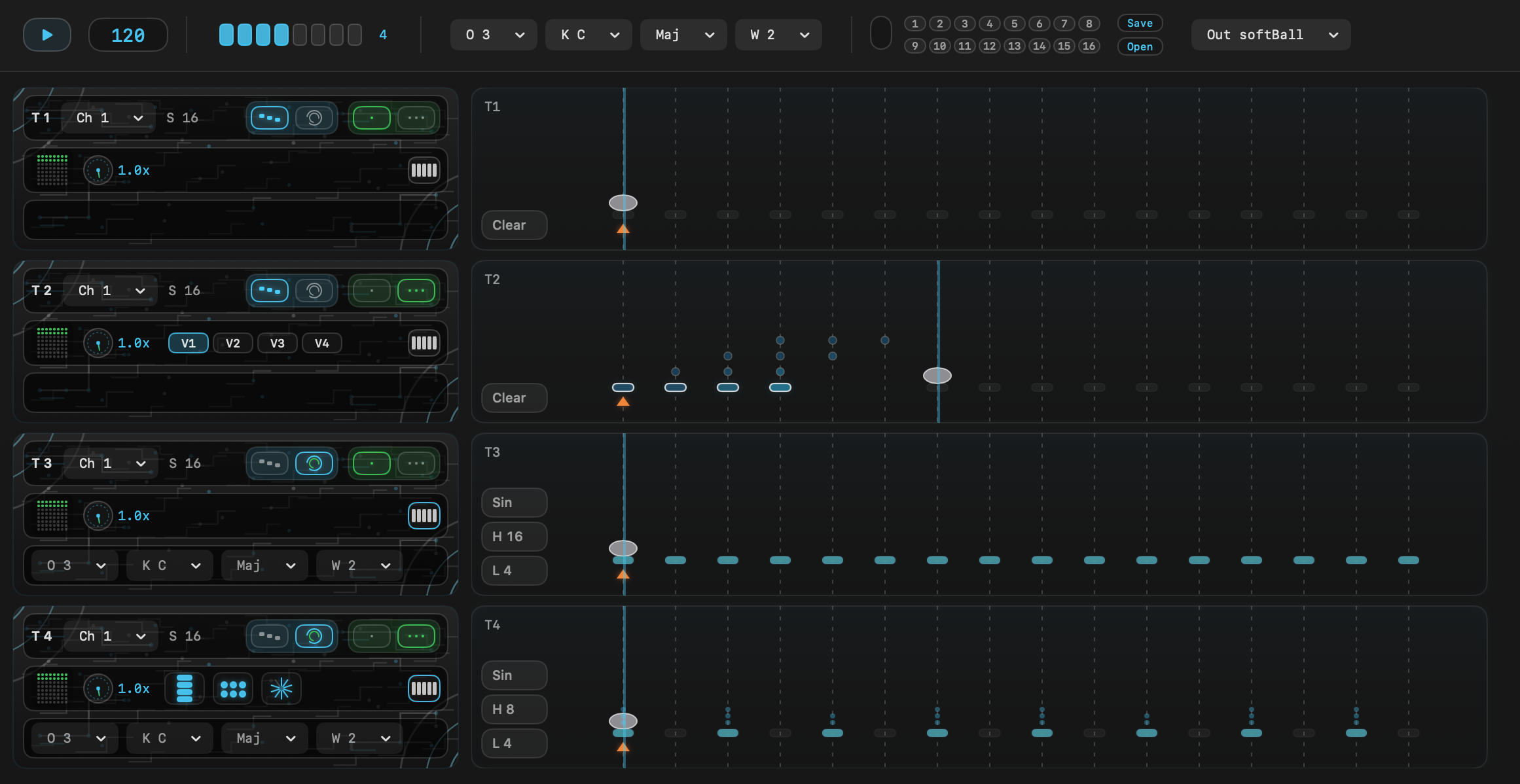
The bouncing motion and step flow stay in sync, so you can follow the timing with your eyes as well as your ears.
macOS MIDI Sequencer
A playful MIDI sequencer for macOS built around the movement of bouncing balls.
Price
$14.00
Approx. JPY 1,900
Highlights
The bouncing motion and step flow stay in sync, so you can follow the timing with your eyes as well as your ears.
Switch between Manual input and algorithmic Euclid patterns depending on how you want to build a groove.
Route MIDI to the virtual port named softBall or choose external destinations such as IAC and other available MIDI ports.
Concept
softBall focuses on three ideas: simplicity, helping users bring out their own style, and making the experience fun to use.
More features may be added over time, but those three ideas should stay constant.
DAWs such as Ableton Live can already do almost anything, and I rely on them a lot.
At the same time, it can be fun to treat apps on your computer as separate modules and combine them in your own way. That is one reason why softBall works with MIDI rather than as a plugin. Of course, sending MIDI to hardware is fun too.
softBall does not use a piano-roll style editor for entering exact note names. Instead, you explore the balance through key and scale settings. The goal is to make music-making feel immediate and approachable.
Why bouncing balls?
Haven't we all stared at enough scrolling step sequencers and piano rolls already?
The motion of a bouncing ball feels naturally connected to rhythm and pulse. And honestly, bouncing is cute.
Manual

Section 01
This area controls playback, BPM, track count, and the global pitch settings.

Section 02
You can store up to 16 snapshots containing BPM and all track settings. Entire projects, including snapshots, can be saved to and loaded from your local disk. MIDI can be sent through the virtual port named softBall or through other available MIDI outputs such as the IAC Driver.
.sbp file. If an existing .sbp file is already open, this will overwrite it..sbp file.Snapshot overwrite and deletion cannot be undone.
You can also use Save As from the menu bar or press cmd + shift + s.
Section 03
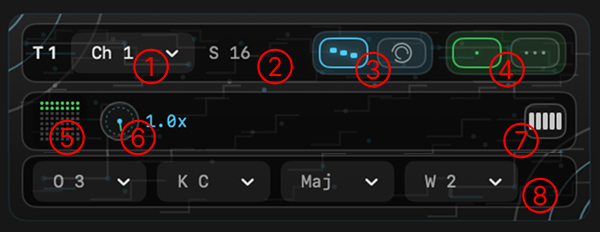
This area is where you adjust settings for each track, including Step, Mode, Poly, Bounce, and pitch-related controls. Use it to switch between Manual and Euclid, then shape each track independently.
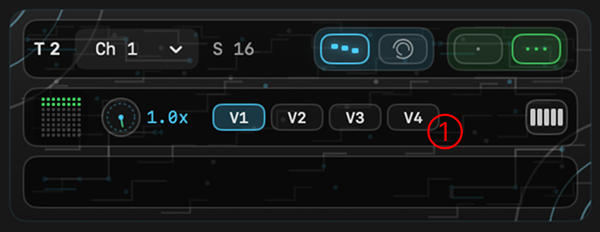
Section 04
This panel appears when polyphonic mode is enabled in Manual mode. Up to four voices are supported.
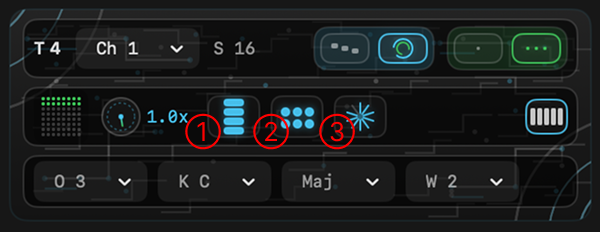
Section 05
This panel appears when polyphonic mode is enabled in Euclid mode. Up to four voices are supported.
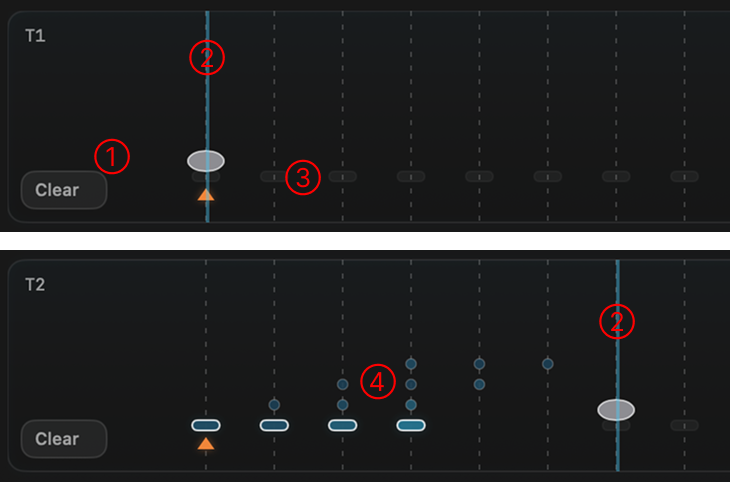
Section 06
This is where you place the note timings that will be played back.
shift + click to move downward in pitch; the lane flashes again at the lowest note. Right-click to remove a note.If you delete a note and place it again, its pitch will be reset.
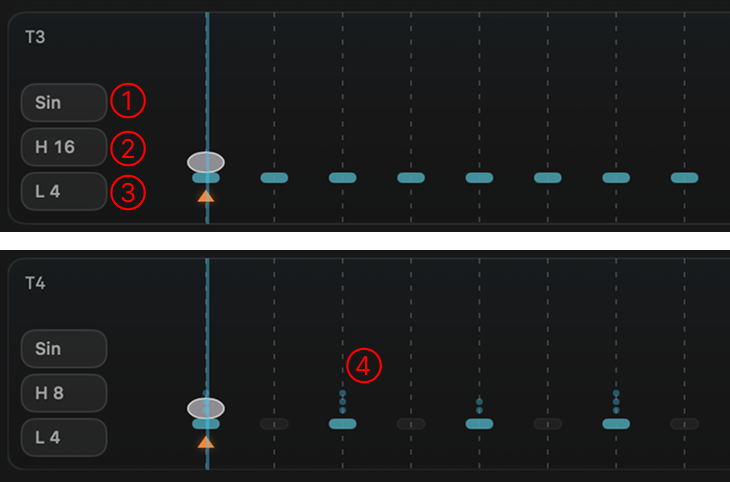
Section 07
When Euclid mode is enabled, lane controls appear inside the lane.
Operating Environment
Purchase
Price
$14.00
Approx. JPY 1,900
If you encounter an issue within 7 days of purchase and it cannot be resolved after support guidance, a refund may be considered. Please contact us first.
Compatibility with DAWs, MIDI devices, and virtual MIDI port recognition depends on each user's environment. We cannot guarantee operation in every external setup.
If you have pre-purchase questions or need help with an issue shortly after purchase, please contact us at: